Plate Labelling
A1
Save your plate maps
Sign in for the web workspace, or download the app — same account, synced across devices.


Step 1
Choose plate type
Step 2
Select wells
Step 3
Add labels & colors
Step 4
Sign in to export
Online plate labelling
Use the website when you need a quick well map — samples, conditions, or replicates — without installing an app or creating an account. Label wells and color-code the layout in your browser; sign in to export PNG or PDF for the bench or your lab notebook.
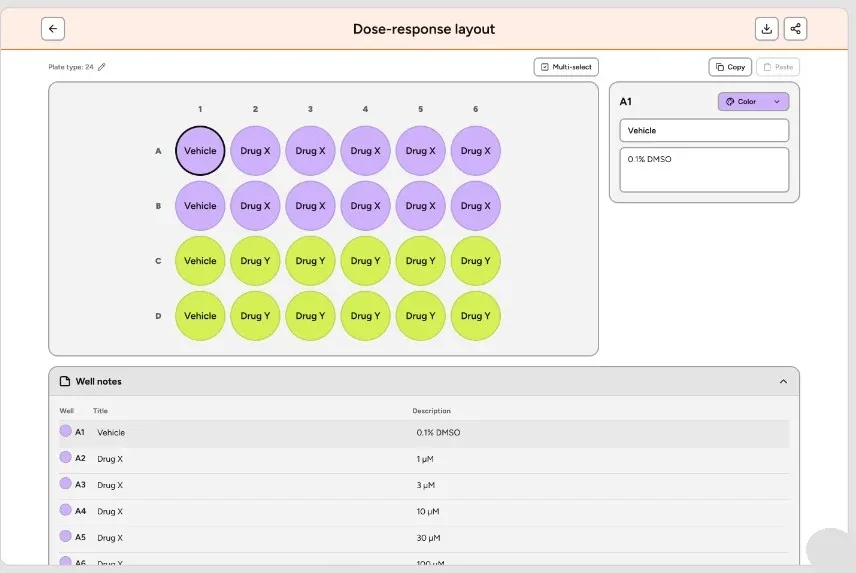
About this plate labelling tool
This free online plate map helps you label wells in the browser. Pick a 6-, 12-, 24-, or 96-well plate (or a custom size), add titles, descriptions, and colors, and multi-select or copy/paste across wells. Sign in to the web workspace or use the app when you need PNG/PDF export or saved projects.
How it works
- 1Choose a plate type (6 / 12 / 24 / 96 wells, or custom).
- 2Select one or more wells on the map.
- 3Add labels and colors. Sign in to export PNG or PDF.
Who is this for?
Useful for researchers, students, and lab teams who map samples onto multiwell plates — ELISA, cell culture screens, PCR layouts, or any experiment where a clear well map beats a handwritten grid.