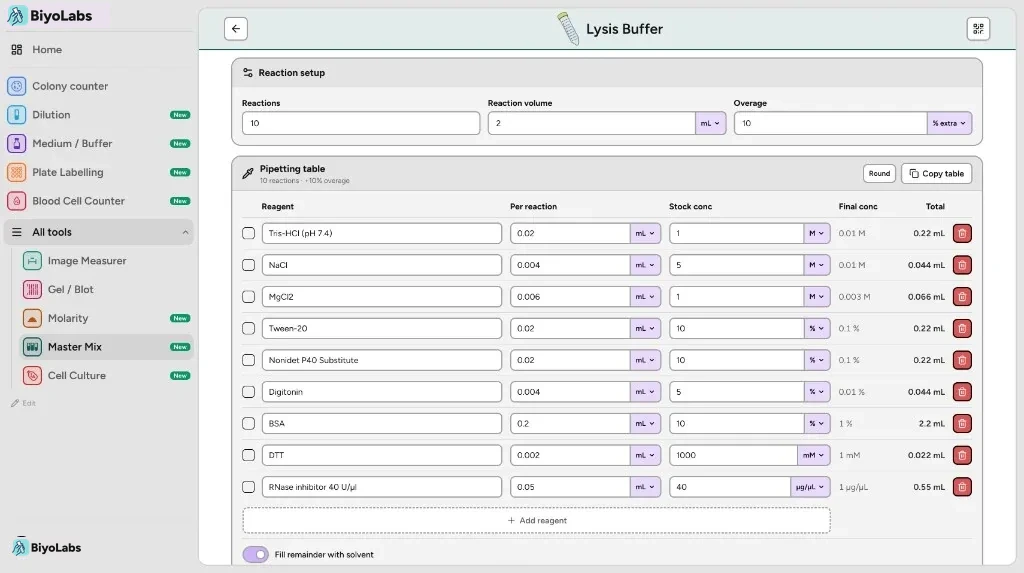
Master Mix Calculator
Pipetting table
10 reactions · +10% overage
| Pipetted | Reagent | Per reaction | Stock conc | Final conc | Total | |
|---|---|---|---|---|---|---|
µL | 1 | 27.5 µL | ||||
µL | 0.2 | 5.5 µL | ||||
µL | 0.2 | 5.5 µL | ||||
µL | 0.2 | 5.5 µL | ||||
µL | — | 1.375 µL | ||||
µL | — | 11 µL |
Save your master mix recipes
Sign in for the web workspace, or download the app — same account, synced across devices.


Step 1
Set reactions, volume & overage
Step 2
Add reagents & volumes
Step 3
Read totals to pipette
Step 4
Copy or save (sign in)
Online master mix calculator
Use the website when you need PCR pipetting volumes fast — how much of each reagent for 8, 24, or 96 reactions plus overage, and how much water to fill. No install, no account. Sign in to keep saved mixes synced with the BiyoLabs mobile app.
How to calculate a PCR master mix
This free online master mix calculator turns a reaction recipe into bench pipetting numbers. Set how many reactions you need, the volume of each — 20 µL and 25 µL are the usual PCR setups, 50 µL for preparative reactions — and overage as a percent or extra reactions. Add every reagent with its per-reaction volume, and optionally a stock concentration to pipette into the mix and fills the remainder with water or another solvent to hit the target volume. The tool returns the total volume of every reagent to pipette into the mix, plus the water needed to reach the final reaction volume.
How it works
- 1Enter reaction count, volume per reaction, and overage.
- 2Add each reagent with the volume needed per reaction.
- 3Tick reagents off at the bench, copy the table, or sign in to sync saves.
Who is this for?
Molecular biology and biochemistry labs setting up PCR, qPCR, cloning reactions, and other multi-reagent mixes — students and researchers who want pipetting totals without rebuilding the same spreadsheet for every experiment.